Automating tests does not prove the market wants a product. But it helps make sure that, when someone does decide to use it, the experience works as promised.
For a long time I thought of automated testing as an essentially technical step: write code, simulate actions, check that the application responds the way it should.
That definition is still correct, but today I find it incomplete.
An application can work perfectly and still solve the wrong problem. Equally, a team can have identified a real problem and lose users because the main flow breaks in a browser, on a mobile device, or after a seemingly small change.
That is why Playwright caught my attention.
Not just because it automates browsers, but because it makes concrete an idea that sits at the centre of the work we do at Painstack:
We should not trust an assumption when we can test it.
In software development, we test the behaviour of the application.
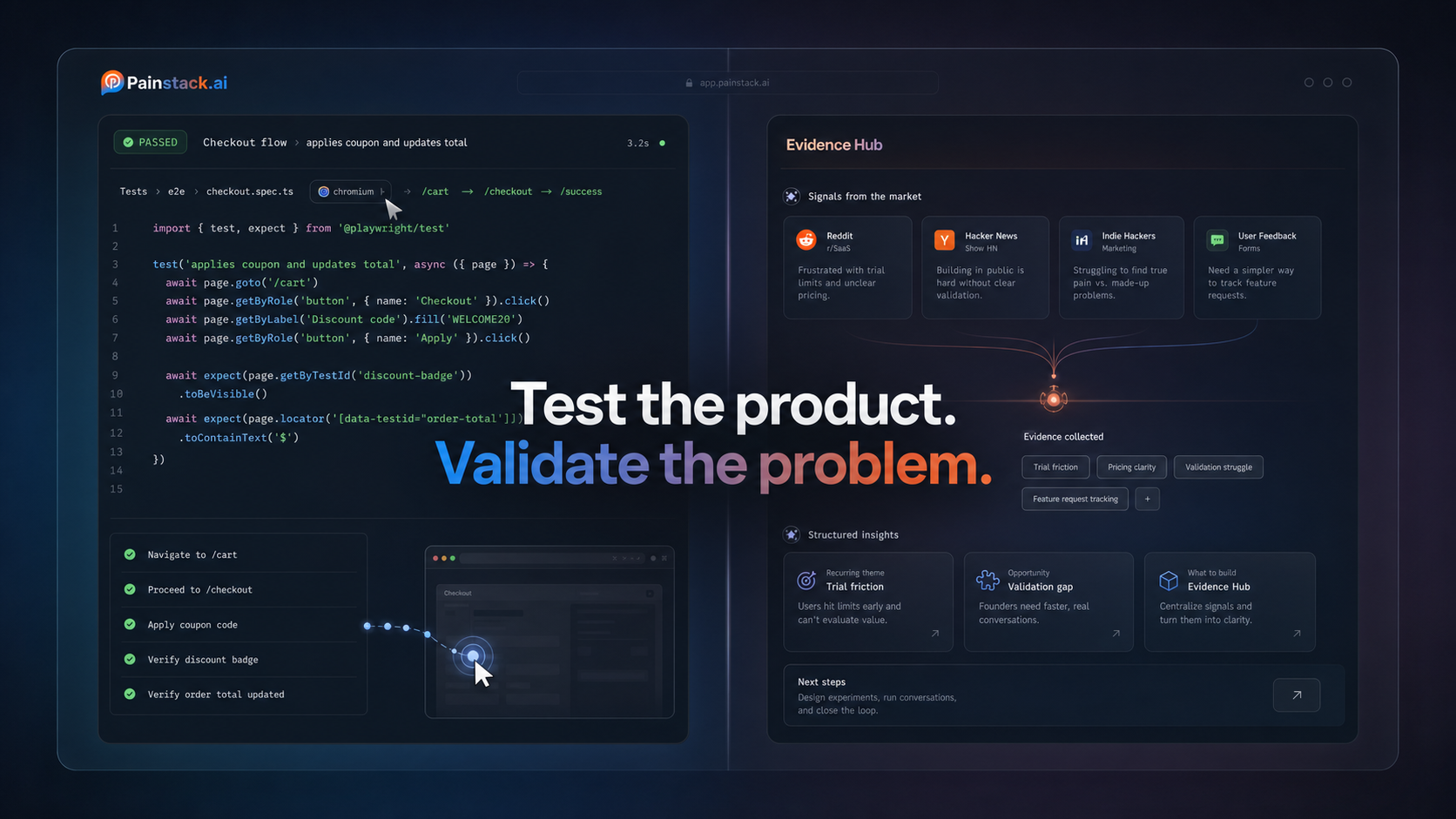
In building a business, we validate the existence and relevance of the problem.
They are different layers of evidence. One test does not replace the other.
What is Playwright?
Playwright is an open-source framework for end-to-end testing of web applications.
An end-to-end test reproduces a full journey from the user's perspective. Instead of checking a single isolated function, we can open the application, fill in a form, click a button and confirm that the expected result appears.
According to the official documentation, Playwright supports:
- Chromium;
- Firefox;
- WebKit;
- Windows, Linux and macOS;
- local or CI execution;
- headed or headless mode;
- emulation of different mobile devices.
Playwright Test also includes the test runner, assertions, isolation between tests, parallelisation, reporting and diagnostic tooling.
That lets the team spend less time on automation infrastructure and more on the behaviours it actually needs to protect.
My first principle: test the journey, not the implementation
One of the most common mistakes in automation is writing tests that are too tied to the internal structure of the page.
Imagine a button with this implementation:
<button class="button-primary blue large">
  Start validation
</button>
We could locate it through its CSS class:
await page.locator('.button-primary.blue.large').click();
The problem is that a visual change can break the test, even when the experience is still correct.
Playwright encourages locators closer to the way users and assistive technologies interpret the page:
await page
  .getByRole('button', { name: 'Start validation' })
  .click();
Here, the test does not care about the colour or the internal class name. It checks whether there is an identifiable button with the expected action.
That distinction matters.
A useful test should protect an experience contract, not freeze every implementation detail.
A first test with Playwright
In a Node.js project, we can start the setup with:
npm init playwright@latest
During installation, Playwright lets you choose TypeScript or JavaScript, define the tests folder and install the browsers you need.
After that, we can create a simple test:
import { test, expect } from '@playwright/test';

test('the home page shows the validation action', async ({ page }) => {
  await page.goto('https://usepainstackai.com/');

  await expect(page).toHaveTitle(/Painstack/i);

  const validationCta = page
    .getByRole('link', { name: /validate/i })
    .first();

  await expect(validationCta).toBeVisible();
});
The test opens the Painstack site and checks two basic conditions:
- The page title identifies the product;
- The main validation action is visible to the user.
It is a simple example, but it represents an important behaviour.
If the page loads without its main call to action, it can be technically online and, at the same time, failing at its job.
Auto-waiting: wait for conditions, not for seconds
Modern interfaces do not always respond immediately.
An element may depend on JavaScript, on an API call or on an animation. In older tools it was common to find manual pauses like this:
await page.waitForTimeout(3000);
That kind of wait is fragile.
If the application responds in 500 milliseconds, the test wastes time. If it responds in four seconds, the test can fail even when there is no functional problem.
Playwright runs actionability checks before performing actions. Before clicking, for instance, it confirms conditions such as visibility, stability and whether the element can be interacted with.
It also offers asynchronous assertions:
await expect(
  page.getByText('Analysis complete')
).toBeVisible();
Instead of waiting arbitrarily for three seconds, the test waits for the condition that actually matters.
This does not automatically remove every flaky test. But it reduces the need for manual synchronisation and helps write checks closer to the real behaviour of the interface.
Every test starts in an isolated environment
Isolation is another relevant point.
Playwright uses Browser Contexts, comparable to fresh, independent browser profiles. Each test can start with no cookies, sessions or state left behind by the previous test.
For example:
test('an unauthenticated user sees the login option', async ({ page }) => {
  await page.goto('/');

  await expect(
    page.getByRole('link', { name: /sign in|login/i })
  ).toBeVisible();
});
Another test can use its own authenticated state, without depending on a previous run.
That independence has two advantages:
- tests can run in parallel;
- a failure tends to be easier to reproduce.
When test B only works after test A, the suite stops representing independent users and starts depending on execution order.
Testing in more than one browser
An application that works in Chromium is not automatically validated in every browser.
Playwright lets you configure different projects in the playwright.config.ts file:
import { defineConfig, devices } from '@playwright/test';

export default defineConfig({
  testDir: './tests',

  projects: [
    {
      name: 'chromium',
      use: { ...devices['Desktop Chrome'] },
    },
    {
      name: 'firefox',
      use: { ...devices['Desktop Firefox'] },
    },
    {
      name: 'webkit',
      use: { ...devices['Desktop Safari'] },
    },
    {
      name: 'mobile',
      use: { ...devices['iPhone 13'] },
    },
  ],
});
The same suite can then check behaviour across different browser engines and in a mobile configuration.
The goal should not be to build a huge matrix with no criteria. The sensible move is to start with the environments your audience uses and the journeys with the highest impact.
Technical coverage without product priority easily turns into maintenance cost.
When a test fails, the Trace Viewer shows the context
An isolated error message does not always explain what happened.
The Trace Viewer lets you analyse the run step by step. We can see the state of the page before and after each action and inspect:
- screenshots;
- logs;
- network requests;
- errors;
- console messages;
- the source code tied to the action;
- DOM snapshots.
One possible configuration is to save the trace on the first retry of a test:
import { defineConfig } from '@playwright/test';

export default defineConfig({
  use: {
    trace: 'on-first-retry',
  },
});
This is particularly useful in continuous integration. If a test fails away from the developer's machine, the trace offers far more context than a generic message in the terminal.
It does not replace careful investigation, but it reduces how much guessing is needed.
What should we test first?
It is easy to fall into the temptation of automating everything.
I prefer to start from a more concrete question:
Which failure would stop the user from getting the main value of the product?
In a SaaS application, the first suite can protect journeys such as:
- The home page loads;
- The value proposition and the main action are visible;
- The user can create an account or sign in;
- The core flow accepts the required data;
- The system shows an understandable progress state;
- The final result can be viewed;
- Validation errors are shown clearly;
- The essential journeys work on desktop and mobile.
Only then does it make sense to expand into variations, edge cases and less critical regressions.
This prioritisation brings the testing strategy closer to the product strategy. We do not test a feature just because it exists. We test it because there is an important behaviour we do not want to lose.
Playwright does not validate whether anyone needs the product
This is the distinction I consider most important.
Playwright can confirm that:
- the button appears;
- the form accepts valid data;
- navigation reaches the expected destination;
- the result is displayed;
- the journey works across different browsers.
But it cannot prove that:
- the problem is frequent;
- the problem is important enough;
- the audience is looking for an alternative;
- the value proposition is understood;
- anyone would pay for the solution.
Those questions need a different kind of evidence: interviews, search patterns, community discussions, existing alternatives, usage behaviour and market signals.
It is exactly in this layer, before development, that Painstack operates: organising evidence about a problem before turning a hypothesis into a large product bet.
We can summarise it like this:
Market validation helps us decide what is worth building. Playwright helps us check that what we built still works.
Having only one of the two leaves a gap.
Without problem validation, we risk shipping stable software nobody needed.
Without product testing, we can identify a real need and deliver an experience that fails at the decisive moment.
Tests are executable evidence
I like to think of an automated test as an executable statement.
When we write:
await expect(validationCta).toBeVisible();
we are declaring that the presence of that action is part of the product's current contract.
On every run, that statement is checked again against the real application.
That does not make the test a permanent truth. The product can change, the contract can evolve, and the test itself can be wrong. But it forces us to make the expected behaviour explicit.
The same principle applies to building products.
A written hypothesis is better than a vague intuition. A hypothesis tested against evidence is better than a hypothesis that is merely well presented.
Playwright and Painstack operate at different points in the process, but they share a discipline: turning implicit expectations into observable checks.
Conclusion
Playwright is a solid option for teams that need to test modern web applications across browsers, with isolation, automatic waiting and visual diagnostic tools.
But its greatest value is not in artificially increasing the number of tests.
It is in protecting the journeys that hold up the experience promised to the user.
Before automating, we need to choose the right behaviour.
Before building, we need to validate the right problem.
In both cases, the goal is not to remove uncertainty entirely. It is to reduce decisions based only on confidence, opinion or memory.
Building fast still matters.
Knowing what to test, and what is worth building, matters even more.